A customer emails asking for a refund. Sounds simple? Not so fast!
Here is what actually happens: you open Stripe, search for the customer, find the charge, verify the amount, go back to your inbox, draft a reply, switch back to Stripe, issue the refund, then send the confirmation. Seven to ten minutes per ticket.
Multiply that by 20 refund requests a week and you have burned through two-plus hours on something that should take seconds.
Manual refund processing is not just slow. It creates real business risk.
Tab-switching under pressure is how mistakes happen: wrong charge, wrong amount, wrong customer. And when response time stretches past a few hours, customers notice.
Slow refund handling is one of the fastest ways to turn a recoverable situation into a chargeback or a public complaint.
For a solo founder or a two-person team, refund emails compete with everything else on your plate. At 7 minutes per ticket, 30 support tickets a day adds up to 3.5 hours of reactive work, before you have written a single line of code or shipped anything.
But before we get to automation, let’s understand how Stripe refunds actually work.
How Stripe Refunds Actually Work
Stripe has a full refunds API, which you can use to issue full or partial refunds on any charge, retrieve refund status, and cancel pending refunds.
The API is well-documented and reliable, but it is not the easiest thing to work with.
The challenge is not the API. The challenge is connecting the trigger (a customer email) to the action (a Stripe refund) without building a custom integration from scratch or paying for a platform designed for a 50-person support team.
Let’s break it down.
The Standard Workflow (and Why It Breaks Down)
Here is what most small SaaS teams are doing right now:
- Customer emails support@yourcompany.com
- You open the email in Gmail or Outlook (or any other email client)
- You open a new tab, go to Stripe, search by email
- You find the charge and verify the amount
- You go back to your inbox and draft a reply
- You return to Stripe and issue the refund
- You send the confirmation manually
Every step is manual. Every step is a context switch. If you have a part-time support hire, you are also training them on this exact flow and hoping they do not refund the wrong charge.
It breaks down under volume, under fatigue, and any time the customer’s email does not match what is in Stripe. Mistakes happen.
That’s why you need to automate.
How to Automate Stripe Refunds from Your Support Inbox
Three realistic options exist for small teams in 2026. Each comes with different tradeoffs and costs.
Option 1: Build It Yourself with Zapier or Make
You can wire up a Zap or Make scenario that watches for refund-related emails, parses the customer address, looks up the charge in Stripe, and triggers a refund.
In theory, this works. In practice:
- Email parsing is fragile. “I want a refund”, “please cancel and refund me”, and “I’d like my money back” all need to be caught by your trigger logic.
- Partial refunds, subscription cancellations, and edge cases require separate handling.
- There is no reply drafting. You still write the confirmation yourself.
- Any automation error means a missed refund or a double refund.
- Setup takes hours, not minutes — and maintenance is ongoing.
This path works if you have automation experience and a very predictable refund request format.
For most founders, it is more work than it looks.
Option 2: Use a Helpdesk with Stripe Integration
Zendesk has a Stripe app in its marketplace. Freshdesk has third-party integrations. Intercom can surface Stripe data through its inbox.
The problem is cost and complexity.
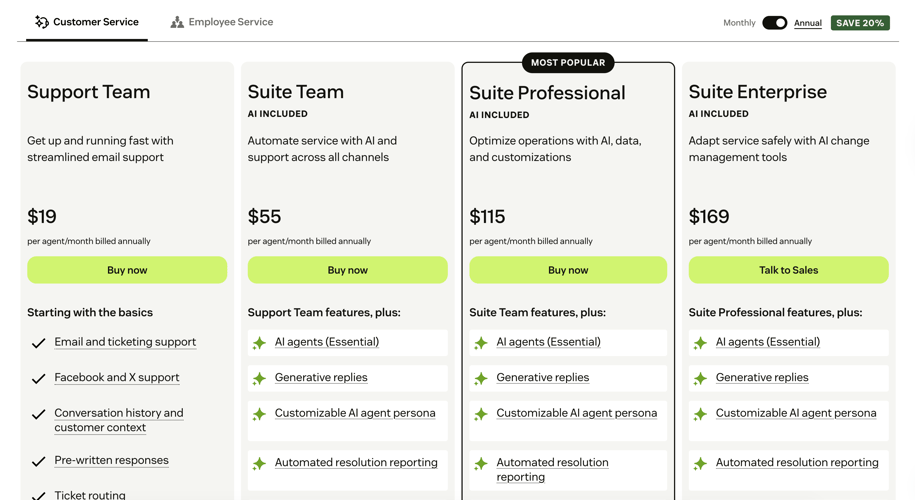
Zendesk starts at $19 per agent per month (annual commitment), then adds a $4.99/month per agent AI add-on on top.
Intercom is enterprise-priced and chat-first.
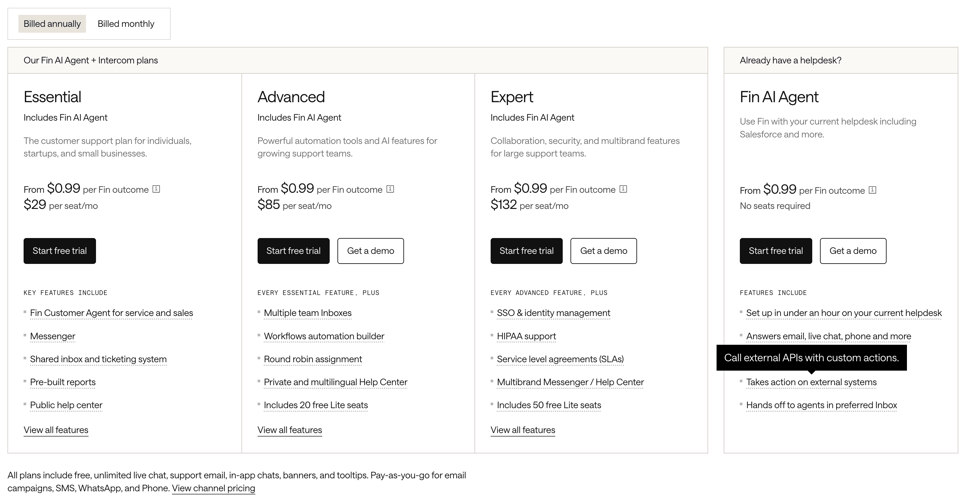
Neither was built for a two-person team that needs to handle refund emails faster. Neither is a good fit for a small SaaS team.
You also end up paying for knowledge base tools, chat widgets, and CRM features you will never use. And the Stripe integrations in these platforms often only surface data for viewing, so actually issuing a refund from inside the ticket requires additional configuration.
Option 3: Use an AI Support Inbox Built for This
This is the option that actually matches how small teams work.
Zipitly is an AI support inbox that connects directly to Stripe via API Keys. When a refund request comes in, the AI reads the email, pulls the customer’s Stripe data automatically, drafts a reply, and surfaces a one-click refund action.
You review it and click Approve.
The refund processes. The reply sends. Under 2 minutes, start to finish.
No tab switching. No manual charge lookup. No copy-pasting customer emails into Stripe’s search bar.
One DNS TXT record gives you a real support@yourcompany.com address, without a Google Workspace subscription. Connect Stripe and you are live.
AI suggests. You approve!
Nothing executes without your confirmation.
What to Look for in Any Refund Automation Setup
Whether you build it yourself or use a tool, these are the things that actually matter:
Accurate intent detection. The system needs to catch refund requests regardless of how customers phrase them. “I want to cancel and get my money back” should trigger the same workflow as “please refund my last payment.”
Automatic customer data lookup. You should not be searching Stripe manually. The tool should pull charge history, subscription status, and payment details the moment the email arrives.
Human approval before execution. Non-negotiable. Any system that fires refunds automatically without a review step is a liability. You need to see the suggested action before it runs.
Reply drafting included. Issuing the refund is half the job. Sending a clear confirmation is the other half. A good setup handles both.
Audit trail. You need a record of who approved what and when — for disputes, and for your own sanity.
Keeping Human Control in the Loop
Automation does not mean handing over the keys. The best setups remove the manual lookup and drafting work while keeping every decision with you.
Think of it this way: the AI does the research and writes the first draft. You decide whether to send it.
This matters especially for refunds. A partial refund on a disputed subscription charge is a different call than a full refund on a billing error. The AI can surface both options. You pick the right one. That judgment stays with you.
Zipitly is built around this model. The AI reads intent, pulls Stripe data, drafts the reply, and suggests the action. You see all of it before anything happens.
You can edit the reply, change the action, or handle it manually. Nothing sends or executes without your explicit approval.
That is not a limitation. That is the point.
The Faster Path Forward
Manual refund handling is a solved problem. The tools exist to take ticket response time from 7 minutes to under 2, handle the Stripe lookup automatically, and keep you in control of every approval.
You do not need a 50-person helpdesk platform to get there. You need a support inbox that connects to Stripe, reads the email, and does the research for you.
See how it works at zipitly.com and join the waitlist to be first in line when Zipitly launches.